January 30, 2026


 Written by castfloer
You upgraded to “Gigabit Fiber” internet. You bought the most expensive plan your provider offers. Yet, your IPTV stream still buffers every 10 minutes.
You feel cheated. “I have 1000Mbps, why can’t I watch a simple football match?”
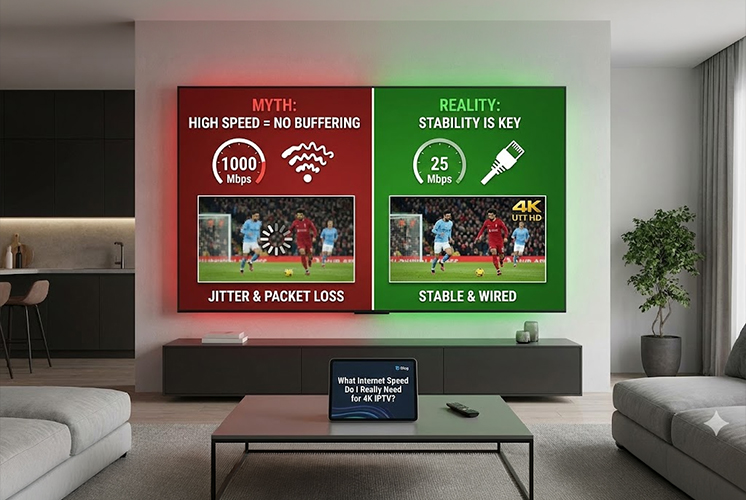
The answer is surprising: Speed is not the problem. Stability is.
In 2026, most people are overpaying for speed they don’t use, while ignoring the one thing that actually matters for live TV. Here is the truth about IPTV internet requirements.
Internet providers love to sell you “Gigabit” speeds, but for streaming, it is overkill. Here is the actual math for what a single stream requires:
That’s it. If you have 25Mbps, you have enough “speed” for 4K. So, why does it still lag?
Streaming on Netflix is easy because it is “On-Demand.” It can download the whole movie 5 minutes ahead of time. Live IPTV cannot do that. It is happening in real-time.
If your internet has “Jitter” (tiny fluctuations in signal), your live stream will break immediately. Having 1000Mbps doesn’t matter if the signal cuts out for 0.1 seconds every minute.
This is the most common reason for support tickets in 2026. Most routers have two frequencies:
Wi-Fi is convenient, but it will never be as stable as a cable.
If your TV is close to your router, buy a cheap Ethernet (LAN) cable. Plugging your device directly into the router eliminates 100% of Wi-Fi interference. It is the single best upgrade you can make—better than buying a new TV or changing providers.
Don’t upgrade your internet plan; upgrade your connection method. 25Mbps is plenty of speed, as long as it is stable.
Switch to 5GHz Wi-Fi, or better yet, plug in a cable. You will save money on your monthly internet bill and get a better picture.
Enjoy endless entertainment with smooth, high-definition streaming and instant access to thousands of channels with Castflo.
© 2026 CastFlo. All Rights Reserved.