January 30, 2026



 Written by castfloer
You pay for 500Mbps Fiber internet. Netflix works perfectly. YouTube works perfectly. But the moment you try to watch a live football match on IPTV, it starts buffering.
Why does this happen? Is the server bad? Maybe. But in 2026, it is highly likely that your Internet Service Provider (ISP) is sabotaging your stream.
This is called “Throttling,” and it is the main reason users think their IPTV service is broken when it’s actually their internet connection.
In this guide, we explain exactly what your ISP is doing and how to stop it.
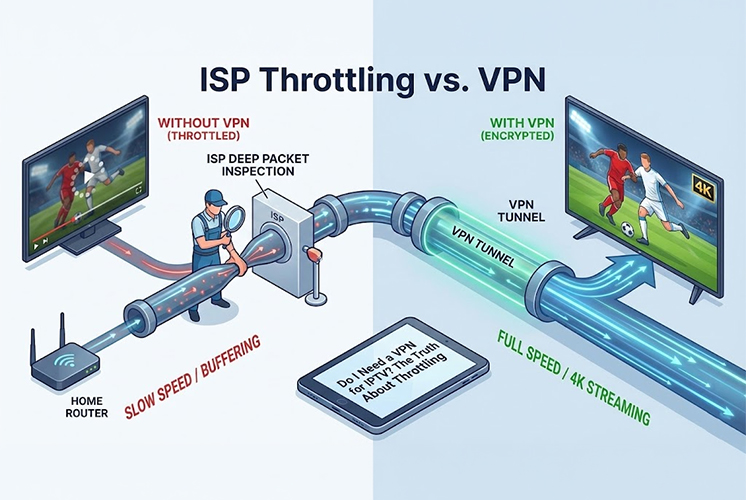
How does your ISP know to slow down your IPTV but not your Netflix? They use a technology called Deep Packet Inspection (DPI).
Imagine your internet data is like a stream of envelopes.
You might run a speed test and see “100Mbps,” but your stream still lags. This is because of Bad Peering.
Think of the internet like a road system. Your ISP wants to save money, so they send your data through the cheapest, most crowded “backroads” to reach the IPTV server. These roads are jammed with traffic.
A VPN acts like a VIP pass. It forces your data to take a different route—often a private, high-speed “highway” that avoids the jams your ISP created. This is why a VPN can sometimes make your internet faster for streaming, even if it adds a small delay.
Not everyone needs a VPN. Here is the checklist to help you decide:
If you have high-speed internet but low-quality streaming, stop blaming the server. Your ISP is likely managing your traffic to save bandwidth.
A VPN is the cheapest insurance policy for your entertainment. However, using a Premium Private Server that actively manages its domains is the best first step.
Enjoy endless entertainment with smooth, high-definition streaming and instant access to thousands of channels with Castflo.
© 2025 CastFlo. All Rights Reserved.